
Module 5: Exploration and Visualization · Lecture 19 of 32
Choose charts according to the comparison you need. Build a time-series view and a category comparison with declared units, honest axes, readable labels, and a data table that supports the visual claim.
What you will learn
- Use the Matplotlib Figure and Axes model.
- Choose line and bar charts for different analytical questions.
- Export a chart with units, source context, and accessible alternatives.
Understand the problem
Choose the visual task
A line chart emphasizes ordered time, while a horizontal bar chart compares category magnitudes. A pie chart is usually a poor choice for comparing several similar values or following change over time. Start from the question: is the reader comparing totals, distributions, relationships, or a trend?
Keep units and transformations visible
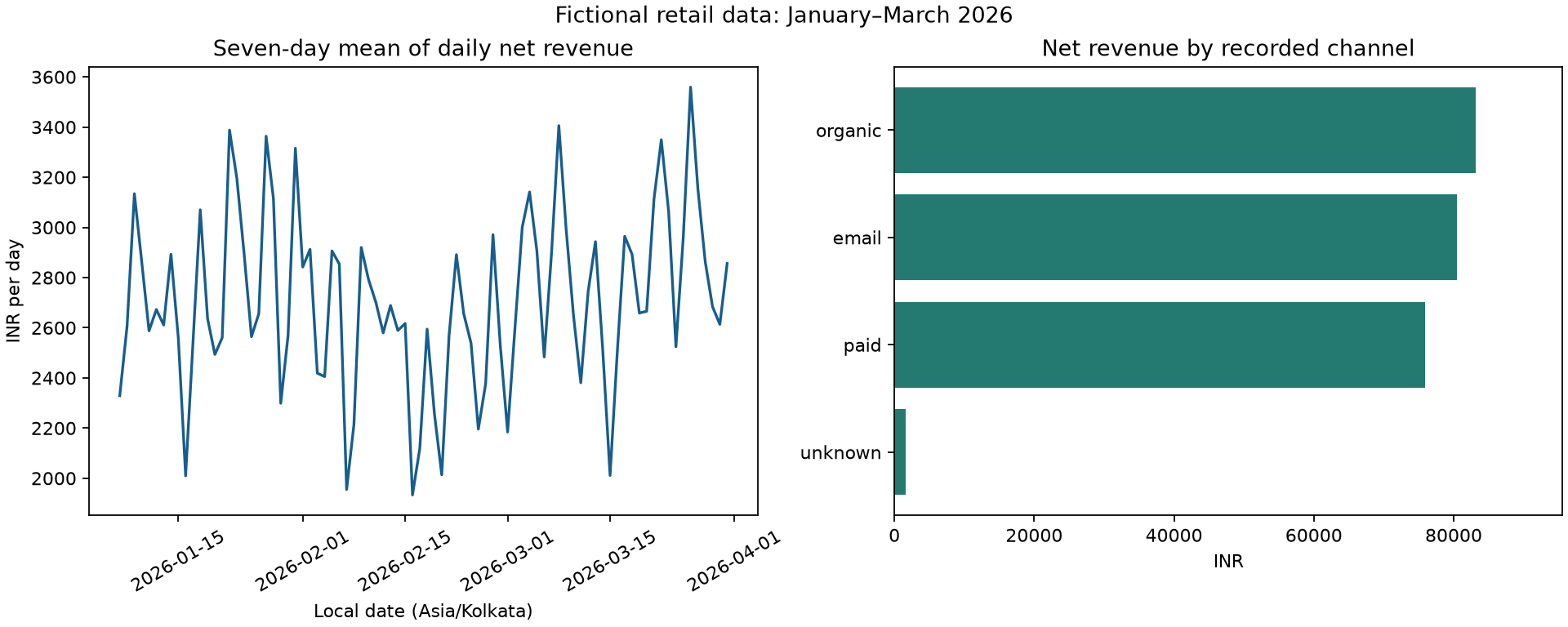
The source amounts are paise; the chart displays INR. The daily line is smoothed with a trailing seven-day mean, so its label must say average daily revenue rather than weekly total. Use a zero baseline for bars when bar length represents magnitude. A truncated line-chart axis can sometimes reveal variation, but it must be clearly labeled and should not exaggerate an unimportant difference.
Use explicit objects
plt.subplots returns a Figure and one or more Axes. Calling plotting and labeling methods on a named Axes reduces ambiguity in multi-panel figures. Save the figure before closing it. A non-interactive backend makes the same code useful in a headless CI job or scheduled report without opening a desktop window.
Communicate beyond color
Provide meaningful axis labels, a descriptive title, and a text or table alternative. Do not rely only on red versus green to convey status. State that the data is fictional and include the reporting population. A polished chart is not a substitute for denominator checks or evidence of causation. Keep the underlying summary CSV beside the image so a reviewer can inspect exact amounts.
Run the worked example
Download and extract the course kit linked below. Open a terminal in the extracted folder, complete the setup in Lecture 2, and run python run_course.py --lesson 19 --examples-only. Each script starts from the shared dataset; it does not depend on a notebook cell from another lecture. All retail records are fictional and amounts are integer paise unless a chart explicitly says INR.
from pathlib import Path
import numpy as np
import pandas as pd
from course_data import load_orders, load_raw, load_customers, clean_orders, ROOT, OUT

import matplotlib
matplotlib.use('Agg')
import matplotlib.pyplot as plt
orders = load_orders()
local = orders.assign(local_time=orders['ordered_at'].dt.tz_convert('Asia/Kolkata'))
daily = local.set_index('local_time')['net_paise'].resample('D').sum() / 100
trend = daily.rolling(7, min_periods=7).mean()
channels = orders.groupby('channel')['net_paise'].sum().sort_values() / 100
fig, axes = plt.subplots(1, 2, figsize=(12, 4.8), layout='constrained')
axes[0].plot(trend.index, trend.values, color='#175D8D')
axes[0].set(title='Seven-day mean of daily net revenue', ylabel='INR per day', xlabel='Local date (Asia/Kolkata)')
axes[0].tick_params(axis='x', rotation=30)
axes[1].barh(channels.index.astype(str), channels.values, color='#247A70')
axes[1].set(title='Net revenue by recorded channel', xlabel='INR', xlim=(0, float(channels.max()) * 1.15))
fig.suptitle('Fictional retail data: January–March 2026')
path = OUT / 'retail-overview.png'
fig.savefig(path, dpi=160)
plt.close(fig)
channels.rename('net_inr').to_csv(OUT / 'chart-channel-data.csv')
assert path.stat().st_size > 1000
print('Saved outputs/retail-overview.png and outputs/chart-channel-data.csv')
Verified output
Saved outputs/retail-overview.png and outputs/chart-channel-data.csv
Walk through the result
The first panel keeps calendar order and reveals a smoothed descriptive trend. The second sorts channels by total amount for easy comparison. Its baseline begins at zero, so relative bar lengths remain interpretable. The channel unknown is retained. The image title identifies fictional data and the time window; the axis label distinguishes a daily mean from a total. The exported CSV makes exact values available without estimating them from pixels.
Common mistakes and diagnosis
Do not compare two plots with different scales as though equal heights imply equal amounts. Do not put unrelated units on a dual axis merely to create an apparent relationship. Avoid titles such as “paid marketing drove growth” when the data only describes recorded channel totals. Save before close, and avoid show in an unattended job. Keep plot generation deterministic for report verification.
Practice assignment
Create a separate monthly revenue bar chart with a zero baseline and a title that identifies the three calendar months. Include a table of monthly totals and note February's shorter duration. Add alt text explaining what the figure compares without making a causal claim.
Worked solution and explanation
Add the following code below the worked example, or run the matching file in the solutions folder. Compare the result with the business definition before trusting a passing assertion.
monthly = local.set_index('local_time')['net_paise'].resample('MS').sum() / 100
fig, ax = plt.subplots(figsize=(6, 4), layout='constrained')
ax.bar(monthly.index.strftime('%Y-%m'), monthly.values, color='#175D8D')
ax.set(title='Fictional monthly net merchandise revenue', xlabel='Local calendar month', ylabel='INR')
fig.savefig(OUT / 'monthly-revenue.png', dpi=160)
plt.close(fig)
assert np.isclose(monthly.sum(), orders['net_paise'].sum() / 100)
Check your understanding
What should an accessible text alternative explain for this two-panel figure?
Answer guide
It should identify the fictional population, reporting period, measure and units, and the comparison each panel supports. Exact amounts should be available in a table. It should not assert causation or imply a complete business-performance picture when costs, marketing spend, and source coverage outside this export are absent.
Reference and next step
Download the complete course kit: datasets, all examples, solutions, and capstone.
Return to the full Data Analysis with Python and pandas curriculum.
